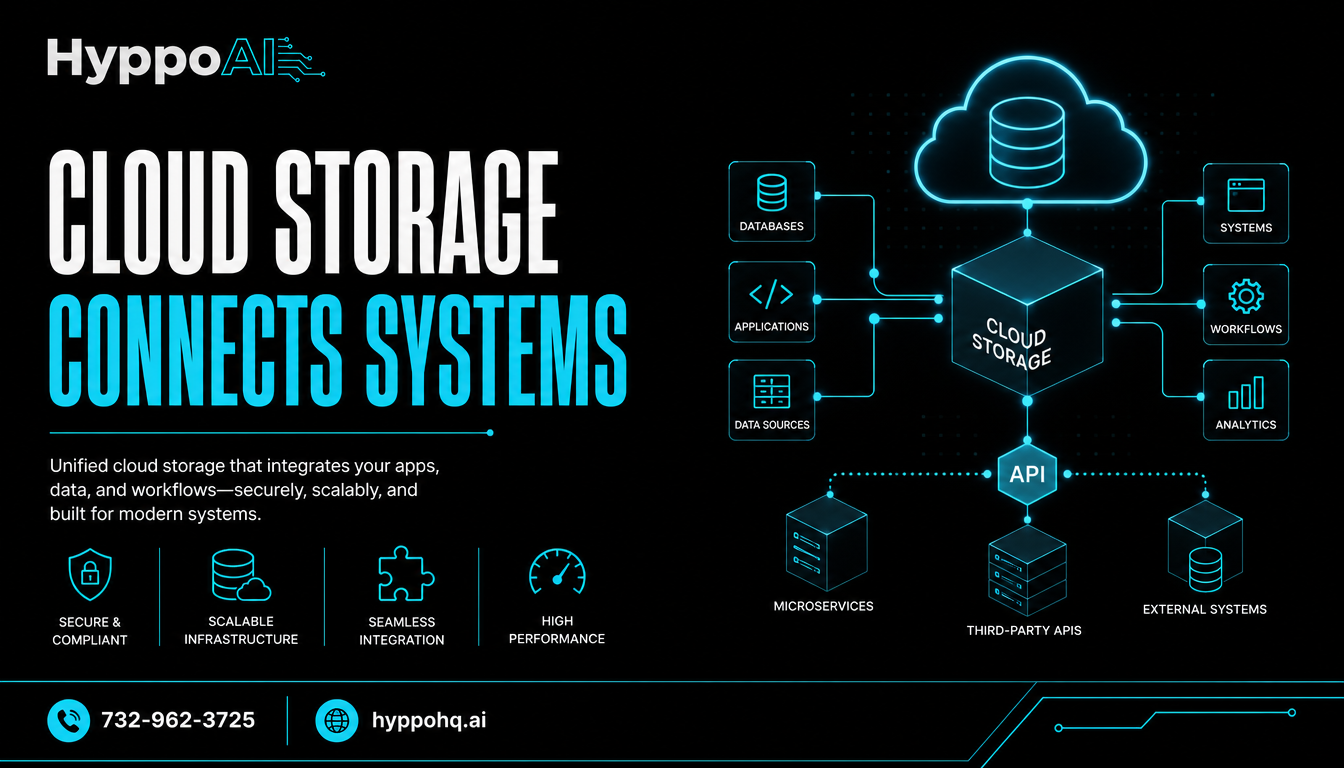
Why cloud storage acts as glue between systems
Cloud storage is often treated like a digital filing cabinet. That description is incomplete.
In practice, cloud storage often acts as the glue between systems. It gives different tools, teams, and workflows a shared place to exchange information without constant manual effort. For small and mid-sized businesses, that matters because most operations already rely on multiple platforms: CRM, email, accounting, scheduling, forms, internal docs, and increasingly, AI tools.
When those systems do not connect well, work slows down. Data gets copied by hand, files go missing, and teams operate from different versions of the truth. Cloud storage helps reduce that friction.
What “glue between systems” really means
When people talk about systems integration, they often think about direct app-to-app connections. Those are useful, but they are not the whole picture.
Cloud storage becomes the glue when it serves as a shared layer where systems can:
- store files in a consistent location
- access updated documents from anywhere
- trigger workflows when files are added or changed
- preserve records for collaboration and reporting
- support automation across disconnected tools
Instead of every platform needing a custom connection to every other platform, cloud storage can provide a practical middle ground.
For SMBs, that is a big deal. Simpler architecture usually means:
- fewer manual handoffs
- lower operational friction
- easier team collaboration
- better visibility into business activity
- more reliable automation
Why businesses end up needing a shared data layer
Most businesses do not build their tech stack all at once. They add tools over time.
A scheduling app solves one problem. A CRM solves another. Then come shared folders, invoicing software, intake forms, proposal tools, chat, and AI assistants. Each tool may work well on its own, but the business still needs those tools to work together.
That is where cloud storage becomes valuable.
It gives the business a common place for important assets such as:
- customer documents
- signed forms
- project files
- invoices and receipts
- call transcripts
- reports
- marketing assets
- AI-generated outputs
Without that shared layer, information tends to scatter across inboxes, desktops, and isolated apps.
A simple example
Imagine a service business that receives a new lead through a web form.
That lead may trigger several actions:
- contact details are added to a CRM
- an intake PDF is created
- supporting images are uploaded
- a proposal is generated
- internal staff are notified
- AI summarizes the request for follow-up
If those assets live in one cloud storage environment with clear naming and folder logic, every system has a better chance of staying aligned. If not, people start hunting for files, asking for resends, or recreating work.
How cloud storage supports automation
Automation depends on predictable inputs and accessible outputs.
Cloud storage helps with both.
Many workflows can be triggered by events such as:
- a file being uploaded
- a folder being updated
- a document being signed
- a transcript being saved
- an image being added to a project folder
That means cloud storage is not just passive storage. It can act as an operational checkpoint in a broader workflow.
For example, a business might automate the following:
- Save a customer intake form to cloud storage.
- Trigger an AI tool to extract key details.
- Push those details into a CRM or task system.
- Notify the right team member.
- Archive the original file for compliance and future reference.
This is where cloud storage becomes glue in a very practical sense. It gives automation a stable handoff point.
Why this matters for AI systems
AI is only as useful as the information it can access and the workflows it can support.
For SMBs adopting AI, cloud storage can help bridge the gap between raw business data and useful AI output.
AI tools often need access to:
- documents
- transcripts
- knowledge bases
- images
- templates
- historical records
When those assets are organized in cloud storage, it becomes easier to:
- retrieve context for AI prompts
- centralize documents used by internal teams
- feed structured workflows with unstructured files
- maintain version control on source materials
- support repeatable processes instead of one-off tasks
In other words, cloud storage helps AI move from novelty to operations.
Key benefits of using cloud storage as system glue
1. Better accessibility
Teams can access the same files from different devices and locations. That reduces delays and helps remote or distributed teams stay coordinated.
2. Fewer silos
When documents and assets live in one accessible environment, fewer things get trapped inside personal inboxes or local machines.
3. Easier collaboration
Shared access, comments, edits, and version history make it easier for people to work together without duplicating files.
4. Stronger process consistency
If workflows always pull from and save to the same places, the process becomes easier to repeat, train, and improve.
5. Smarter automation opportunities
Once storage is structured well, businesses can build automations around file events, naming conventions, and folder paths.
Common mistakes to avoid
Cloud storage only works as glue if it is set up intentionally.
Here are a few common issues:
- messy folder structures that no one understands
- inconsistent file naming conventions
- unclear permissions and ownership
- duplicate files across multiple systems
- no process for archiving old materials
- storing everything, but organizing nothing
A cluttered cloud drive can create almost as much friction as disconnected systems.
What to do instead
Start with simple standards:
- define folder structures by function or workflow
- use consistent file naming rules
- decide where final versions live
- limit unnecessary duplicates
- connect storage to key business processes
- review access and permissions regularly
The goal is not perfection. The goal is operational clarity.
Cloud storage is not the whole strategy
It is important to be realistic. Cloud storage alone does not solve integration.
It will not replace:
- a well-designed CRM
- process documentation
- workflow automation tools
- governance and permissions
- data quality standards
But it does provide a practical foundation. For many SMBs, it is one of the easiest ways to create order across a growing stack of tools.
That is why cloud storage often acts as glue between systems. It supports the movement of files, context, and workflow steps across the business.
Final takeaway
If your business uses multiple platforms, cloud storage is probably doing more than holding documents. It is helping systems stay connected, teams stay aligned, and automation stay functional.
The real value is not just storage capacity. It is operational continuity.
When cloud storage is structured well, it becomes a shared layer that supports collaboration, automation, and AI adoption without unnecessary complexity.
If you want help designing smarter workflows and connected systems for your business, HyppoAI can help. Visit https://hyppohq.ai or call +17329623725 to learn how we support SMBs with practical AI and automation solutions.
