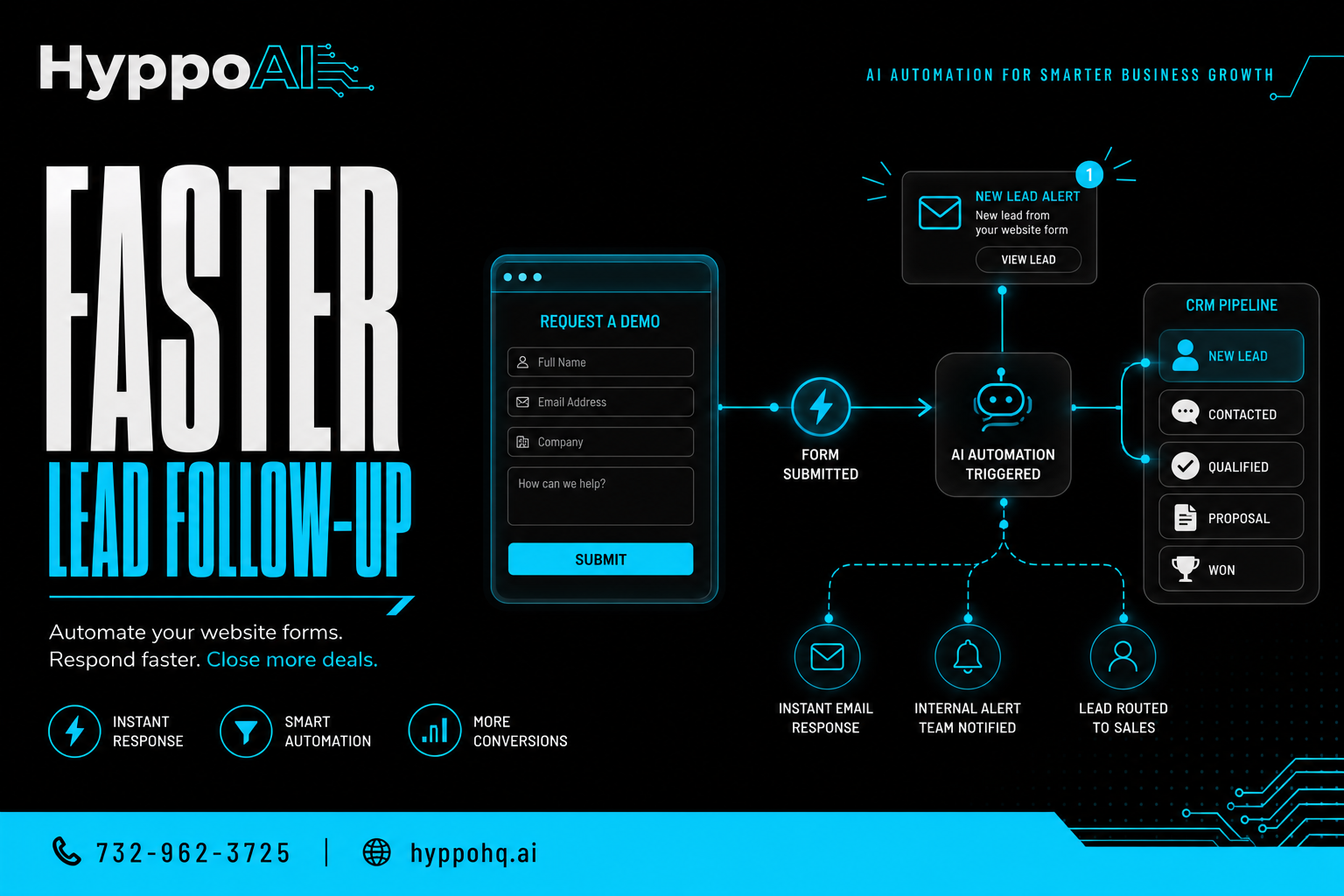
How website forms trigger automation for faster lead follow-up
Website forms are often treated like simple contact tools. A visitor fills one out, the message lands in an inbox, and someone gets back to them when they can.
That works, but it is slow, inconsistent, and easy to break as your business grows.
The better approach is to make your form the starting point of an automated workflow. Instead of just collecting information, your website form can trigger actions instantly across your systems. That means faster responses, cleaner handoffs, and fewer missed opportunities.
For SMBs, this is one of the simplest ways to improve operations without adding headcount.
What it means when website forms trigger automation
When website forms trigger automation, every submission becomes an event that starts a sequence of actions.
Instead of sending a basic email notification, the form can:
- create a new lead in your CRM
- assign the lead to the right team member
- send an instant confirmation email or text
- notify sales or support in Slack or another internal tool
- add the contact to a follow-up sequence
- tag the lead based on interest, service type, or urgency
- schedule tasks automatically
The form is the input. Automation is what happens next.
This matters because speed and consistency directly affect conversion. If a prospect reaches out and hears nothing for hours, or days, momentum is lost. If every lead is handled the same way within seconds, your business becomes easier to scale.
Why this matters for SMBs
Small and midsize businesses do not have time for manual admin on every inquiry. Most teams are already balancing sales, service, and operations at once.
Manual form handling creates common problems:
- leads sit in inboxes too long
- messages get forwarded late or not at all
- follow-up depends on who is available
- data is entered incorrectly or duplicated
- reporting becomes incomplete
Automation fixes these gaps by turning one submission into a repeatable process.
That does not just save time. It improves the customer experience.
The customer expects speed
When someone fills out a form, they expect acknowledgment right away. Even a simple confirmation message can reassure them that their request was received.
With automation, you can send that response instantly while also moving the lead into the next step.
Your team needs clean handoffs
If a sales inquiry, support request, and partnership form all go to the same inbox, things get messy fast.
Automation can route each submission based on the form type or answers provided. That keeps the right work with the right people.
A simple example of how form automation works
Let us say a visitor lands on your site and fills out a quote request form.
The moment they click submit, your automation could:
- capture their name, email, phone, and service request
- create a lead record in your CRM
- tag the lead as "quote request"
- notify your sales team instantly
- send the prospect a confirmation email
- trigger a text message follow-up if a phone number is provided
- assign a task for a rep to call within 15 minutes
- add the lead to a pipeline for reporting
All of that can happen in seconds.
The key point is this: the form is not the end of the interaction. It is the trigger.
Common automation triggers tied to website forms
Different forms can trigger different workflows depending on the business goal.
Contact forms
A standard contact form can:
- send the inquiry to the right department
- create a contact record
- log the source as website inbound
- send an automated acknowledgment
Quote or estimate forms
A quote request form can:
- route by service category
- score the lead based on budget or urgency
- alert sales immediately
- start a timed follow-up sequence
Booking or consultation forms
These forms can:
- sync with scheduling tools
- confirm appointments automatically
- send reminders before the meeting
- update pipeline stages in your CRM
Support forms
A support form can:
- create a ticket
- classify the issue by type
- prioritize urgent submissions
- notify the support team in real time
Hiring forms
Application forms can:
- store candidate details
- route by role
- send next-step emails
- organize submissions for review
The systems usually involved
Website form automation often connects multiple tools. The exact stack varies, but the workflow usually includes a few core systems.
Website or form builder
This is where the lead enters information. It could be a native website form, landing page builder, or a dedicated form platform.
CRM
The CRM stores the lead, tracks status, and gives your team visibility.
Email and SMS tools
These handle instant confirmations, reminders, and follow-up sequences.
Internal notifications
Slack, Teams, or task management tools can alert your team and assign next actions.
Automation platform
This is the layer that connects systems and defines what happens after the form is submitted.
The important part is not how many tools you use. It is whether they work together reliably.
Best practices when setting up form-triggered automation
Automation works best when the workflow is simple, intentional, and tied to a clear business outcome.
Start with one goal
Do not automate everything at once. Start with a single form and a single objective, such as reducing lead response time.
Keep the form clean
Ask only for information you actually need. Long forms reduce submissions and can create friction.
Map the next step
Before building automation, define what should happen after submission.
Ask:
- who needs to be notified
- what system should store the data
- what response should the customer receive
- what follow-up should happen if no one responds
Use tags and routing rules
Form answers can be used to segment leads automatically. This helps you route faster and personalize follow-up.
Test every path
A workflow that looks right on paper can fail in practice. Test for:
- successful submissions
- missing required fields
- duplicate entries
- notification delivery
- CRM updates
- mobile form behavior
Measure response time and conversion
If the goal is faster follow-up, track it. If the goal is more booked calls, measure that too.
Automation should improve outcomes, not just reduce clicks.
Mistakes to avoid
A few common issues can limit the value of automation.
Treating every form the same
A support request should not follow the same path as a sales lead. Different intent requires different workflows.
Sending generic responses
Instant replies are useful, but they should still feel relevant. Match the message to the form type and expectation.
Failing to notify the team
Customer-facing automation without internal alerts creates a blind spot. Your team still needs visibility.
Overcomplicating the workflow
More steps do not always mean better results. Build the shortest path from submission to action.
Why this is a strong first automation for growing businesses
If you are new to business automation, website forms are one of the best places to start.
Why?
- the trigger is clear
- the business value is immediate
- the workflow is easy to understand
- the impact on lead handling is measurable
In most businesses, form submissions already represent intent. That means you are not creating demand from scratch. You are simply responding better to the demand you already have.
That is where automation creates real leverage.
Final thought
Website forms should do more than collect messages. They should trigger automation that moves leads, tasks, and communication forward instantly.
For SMBs, this is a practical way to reduce manual work, improve consistency, and respond faster without adding operational drag.
If you want to explore smarter workflows for your business, HyppoAI can help you think through what should happen after a form submission and where automation can create the biggest gain. Visit https://hyppohq.ai or call +17329623725 to learn more.
