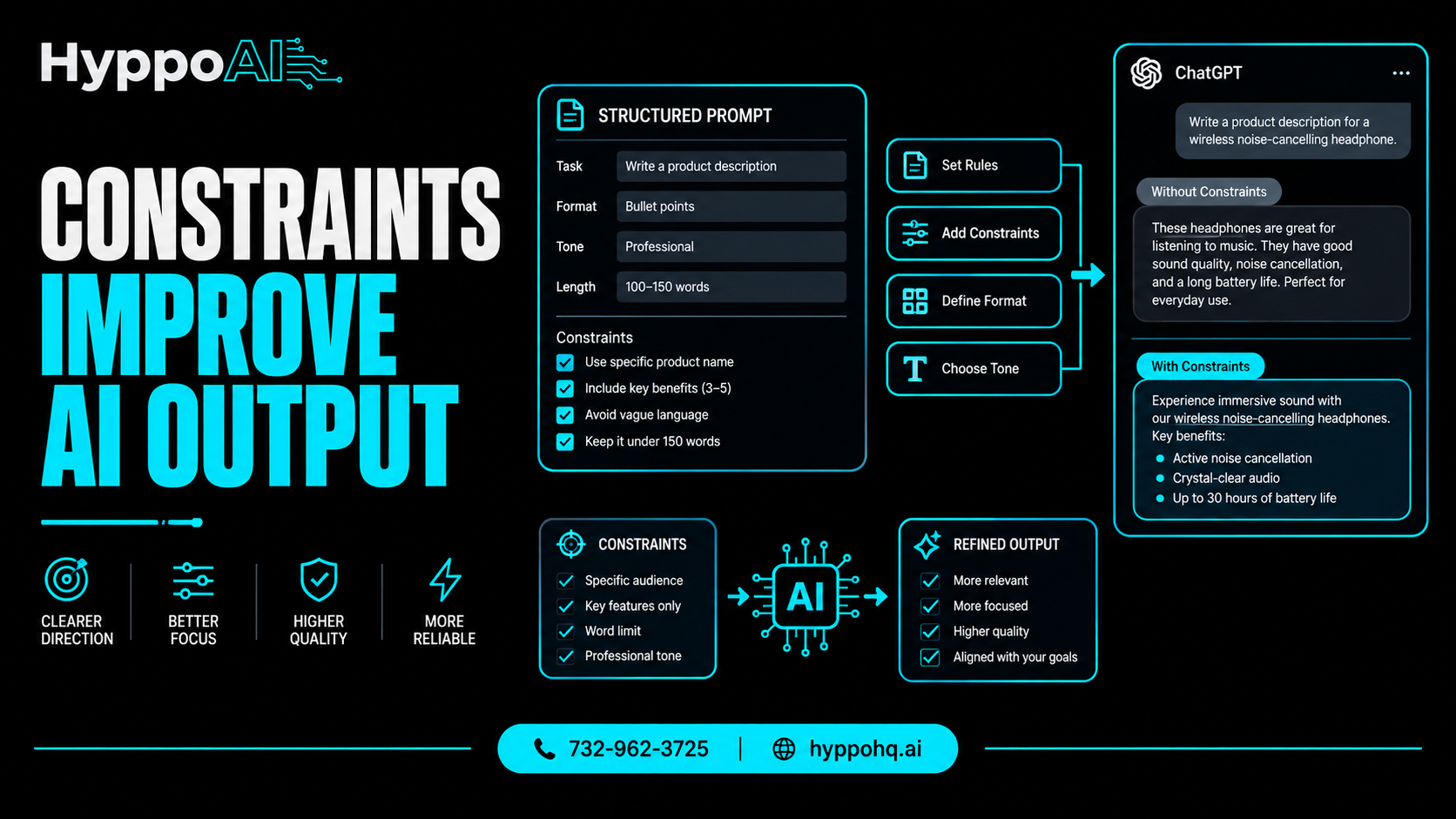
How constraints improve ChatGPT output for better results
ChatGPT is powerful, but raw prompting often leads to generic answers, missed details, or output that sounds close to useful without actually being usable.
That is where constraints come in.
If you want stronger AI results, you do not need to make prompts more complicated. You need to make them more specific. Constraints give ChatGPT boundaries, priorities, and structure. In practice, that usually means better output in less time.
For SMBs, this matters. Teams do not have hours to rewrite AI drafts, clarify vague responses, or test endless prompt variations. The goal is simple: get usable work faster.
What constraints mean in ChatGPT prompting
Constraints are the rules, limits, and instructions you give ChatGPT so it knows what a good answer looks like.
These can include:
- Word count limits
- Tone of voice
- Target audience
- Output format
- Reading level
- Business context
- What to include
- What to avoid
- Number of examples
- Specific goals or success criteria
Without constraints, ChatGPT fills in gaps with probability. With constraints, it has a narrower lane to operate in.
That narrower lane is usually what improves quality.
Why constraints improve ChatGPT output
1. They reduce ambiguity
Most weak AI output starts with vague input.
If you ask ChatGPT to “write a marketing email,” you may get something polished but generic. If you ask it to “write a 120-word follow-up email for an HVAC company targeting missed estimate requests in a direct, helpful tone,” the result is far more likely to be usable.
Constraints remove guesswork.
2. They align output with business goals
ChatGPT does not automatically know what matters most to your business.
Do you want speed, clarity, conversions, professionalism, or brevity? Do you need something for a local service business, an internal SOP, or a client-facing message?
Constraints tell the model what to optimize for.
3. They improve consistency
If multiple people on your team use ChatGPT, constraints help standardize results.
That matters when creating:
- Sales emails
- Customer service replies
- Blog outlines
- Social captions
- Internal documentation
- Lead follow-up scripts
Consistency saves editing time and protects brand quality.
4. They make outputs easier to review
A structured response is faster to scan than a wall of text.
When you request a specific format, such as bullets, table-style comparisons, step-by-step instructions, or a three-part summary, the output becomes easier to evaluate and use.
5. They lower revision cycles
The more clearly you define the target, the fewer rewrites you need.
That is one of the biggest practical benefits for SMBs. Better first drafts mean less back-and-forth and more momentum.
The most useful types of constraints
Not every constraint matters equally. These are the ones that usually create the biggest improvement.
Role constraint
Tell ChatGPT who it should act like.
Examples:
- Act as an operations consultant for small businesses
- Write like a direct-response copywriter
- Explain this like a trainer onboarding a new employee
This helps shape perspective and language.
Audience constraint
Define who the content is for.
Examples:
- For busy HVAC owners
- For first-time homebuyers
- For SMB teams with no technical background
This changes vocabulary, depth, and framing.
Format constraint
Specify the structure you want.
Examples:
- Use 5 bullet points
- Write a 3-step checklist
- Return a short email and subject line
- Format as FAQ
This is one of the fastest ways to improve usefulness.
Length constraint
Set a word, sentence, or paragraph limit.
Examples:
- Keep it under 150 words
- Use 6 bullets max
- Write 3 short paragraphs
Length constraints force focus.
Tone constraint
Tell ChatGPT how the output should sound.
Examples:
- No-nonsense and confident
- Friendly but professional
- Clear, direct, and practical
This is especially useful for brand consistency.
Inclusion and exclusion constraints
Be explicit about what must appear and what should not.
Examples:
- Include one CTA
- Mention missed calls and lead follow-up
- Avoid jargon
- Do not use em dashes
- Do not make unsupported claims
These constraints reduce cleanup later.
Weak prompt vs constrained prompt
Here is a simple comparison.
Weak prompt
Write a LinkedIn post about using ChatGPT better.
Better constrained prompt
Write a LinkedIn post for SMB owners about how constraints improve ChatGPT output. Use a direct, logical tone. Keep it under 180 words. Start with a strong hook. Include one real business benefit and one practical example. End with a CTA. Avoid hype and jargon.
The second prompt gives ChatGPT a job with boundaries.
That is why the output improves.
A simple prompt framework that works
If you want a repeatable method, use this structure:
Task + audience + format + tone + constraints + goal
Example:
Create a follow-up email for a plumbing company targeting leads who stopped responding after requesting a quote. Use a professional, direct tone. Keep it under 130 words. Include a clear CTA to reply or call. Avoid sounding pushy. Goal: increase response rates.
This framework is simple enough for daily use and strong enough to improve output quality quickly.
Common mistakes when adding constraints
Constraints help, but overloading prompts can backfire.
Watch for these issues:
Too many instructions at once
If your prompt includes ten competing priorities, output can become uneven.
Start with the essentials:
- What you want
- Who it is for
- How it should look
- What success means
Vague constraints
“Make it better” is not a useful constraint.
“Make it shorter, clearer, and suitable for a local service business owner” is much better.
Missing business context
ChatGPT performs better when it understands the setting.
Even one sentence of context helps, such as:
- This is for an SMB owner with limited time
- This is for a lead nurture workflow
- This will be used by a front office team
Treating one prompt as final
Good prompting is iterative.
Use the first output as a draft, then refine with tighter constraints.
For example:
- Shorten this by 30%
- Make the CTA clearer
- Rewrite for a less technical audience
- Turn this into a checklist
Why this matters for SMBs using AI
Small and mid-sized businesses do not need more AI noise. They need practical output that supports real work.
Constraints help turn ChatGPT from a novelty into a tool.
Used well, they can improve:
- Content creation speed
- SOP drafting
- Lead follow-up messaging
- Customer communication
- Team training materials
- Internal decision support
The key is not asking AI to do everything.
The key is telling it exactly what good looks like.
Final takeaway
If you want better AI results, do not start by asking for more. Start by narrowing the task.
Constraints improve ChatGPT output because they create clarity. Clarity improves relevance. Relevance improves usability.
That is the real win.
If your business is exploring practical AI systems for marketing, operations, or follow-up, HyppoAI helps SMBs apply AI in ways that save time and produce real results. Visit https://hyppohq.ai or call +17329623725 to learn more.
